<!DOCTYPE html>
	<html lang="vi" xmlns="http://www.w3.org/1999/xhtml" prefix="og: http://ogp.me/ns#">
	<head>
<title>3 cách tạo đề thi trắc nghiệm bạn không thể không biết</title>
<meta name="description" content="3 cách tạo đề thi trắc nghiệm bạn không thể không biết - Savefile - Tin Tức -...">
<meta name="author" content="Hệ thống tạo lập website thi trắc nghiệm trực tuyến AZtest">
<meta name="copyright" content="Hệ thống tạo lập website thi trắc nghiệm trực tuyến AZtest &#91;contact@aztest.vn&#93;">
<meta name="robots" content="index, archive, follow, noodp">
<meta name="googlebot" content="index,archive,follow,noodp">
<meta name="msnbot" content="all,index,follow">
<meta name="google-site-verification" content="J8NLMWE1t_6pzg78DzZTx_0EUz1Akr0iZg7kSM4todQ">
<meta name="yandex-verification" content="7d414f155f86e0ef">
<meta name="generator" content="NukeViet v4.5">
<meta name="viewport" content="width=device-width, initial-scale=1">
<meta http-equiv="Content-Type" content="text/html; charset=utf-8">
<meta property="fb:pages" content="693366270865546">
<meta property="fb:app_id" content="257919581378885">
<meta property="og:title" content="3 cách tạo đề thi trắc nghiệm bạn không thể không biết">
<meta property="og:type" content="website">
<meta property="og:description" content="Savefile - Tin Tức - https&#x3A;&#x002F;&#x002F;aztest.vn&#x002F;tin-tuc&#x002F;savefile&#x002F;tin-doanh-nghiep&#x002F;3-cach-tao-de-thi-trac-nghiem-ban-khong-the-khong-biet-891.html">
<meta property="og:site_name" content="Hệ thống tạo lập website thi trắc nghiệm trực tuyến AZtest">
<meta property="og:url" content="https://aztest.vn/tin-tuc/savefile/tin-doanh-nghiep/3-cach-tao-de-thi-trac-nghiem-ban-khong-the-khong-biet-891.html">
<link rel="shortcut icon" href="https://aztest.vn/uploads/favicon_256_256.png">
<link rel="canonical" href="https://aztest.vn/tin-tuc/savefile/tin-doanh-nghiep/3-cach-tao-de-thi-trac-nghiem-ban-khong-the-khong-biet-891.html">
<link rel="alternate" href="https://aztest.vn/tin-tuc/rss/" title="Tin Tức" type="application/rss+xml">
<link rel="alternate" href="https://aztest.vn/tin-tuc/rss/thong-bao/" title="Tin Tức - Thông báo" type="application/rss+xml">
<link rel="alternate" href="https://aztest.vn/tin-tuc/rss/tin-giao-duc/" title="Tin Tức - Tin giáo dục" type="application/rss+xml">
<link rel="alternate" href="https://aztest.vn/tin-tuc/rss/tin-doanh-nghiep/" title="Tin Tức - Tin Doanh Nghiệp" type="application/rss+xml">
<link rel="alternate" href="https://aztest.vn/tin-tuc/rss/huong-dan-su-dung/" title="Tin Tức - Hướng dẫn sử dụng" type="application/rss+xml">
<link rel="StyleSheet" href="https://aztest.vn/assets/css/font-awesome.min.css">
<link rel="StyleSheet" href="https://aztest.vn/themes/default/css/bootstrap.min.css">
<link rel="StyleSheet" href="https://aztest.vn/themes/tdfoss/assets/stylesheets/jednotka_green.css">
<link rel="StyleSheet" href="https://aztest.vn/themes/tdfoss/css/style.css">
<link rel="StyleSheet" href="https://aztest.vn/themes/tdfoss/css/td.css">
<link rel="StyleSheet" href="https://aztest.vn/themes/tdfoss/css/news.css">
<link rel="stylesheet" href="https://aztest.vn/themes/tdfoss/css/custom.css">
<link rel="StyleSheet" href="https://aztest.vn/assets/css/tdfoss.vi.0.css?t=1747300712">
<link rel="StyleSheet" href="https://aztest.vn/themes/tdfoss/css/td-new.css">
<style>
	body{background: #fff;}
</style>
	    <!--[if lt IE 9]>
	      <script src="https://aztest.vn/themes/tdfoss/assets/javascripts/ie/html5shiv.js" type="text/javascript"></script>
	      <script src="https://aztest.vn/themes/tdfoss/assets/javascripts/ie/respond.min.js" type="text/javascript"></script>
	    <![endif]-->
<script>(function(i,s,o,g,r,a,m){i['GoogleAnalyticsObject']=r;i[r]=i[r]||function(){
(i[r].q=i[r].q||[]).push(arguments)},i[r].l=1*new Date();a=s.createElement(o),
m=s.getElementsByTagName(o)[0];a.async=1;a.src=g;m.parentNode.insertBefore(a,m)
})(window,document,'script','https://www.google-analytics.com/analytics.js','ga');
ga('create', 'UA-53105817-9', '.aztest.vn');
ga('send', 'pageview');
</script>
</head>
	<body class="">
		<noscript><img height="1" width="1" style="display:none" src="https://www.facebook.com/tr?id=496798233988223&ev=PageView&noscript=1" alt="fb-src"/></noscript>
<div id="print">
	<div id="hd_print">
		<h2 class="pull-left">Hệ thống tạo lập website thi trắc nghiệm trực tuyến AZtest</h2>
		<p class="pull-right"><a title="Hệ thống tạo lập website thi trắc nghiệm trực tuyến AZtest" href="https://aztest.vn/">https://aztest.vn</a></p>
	</div>
	<div class="clear"></div>
	<hr />
	<div id="content">
		<h1>3 cách tạo đề thi trắc nghiệm bạn không thể không biết</h1>
		<ul class="list-inline">
			<li>Thứ tư - 11/05/2022 03:26</li>
			<li class="hidden-print txtrequired"><em class="fa fa-print">&nbsp;</em><a title="In ra" href="javascript:;" onclick="window.print()">In ra</a></li>
			<li class="hidden-print txtrequired"><em class="fa fa-power-off">&nbsp;</em><a title="Đóng cửa sổ này" href="javascript:;" onclick="window.close()">Đóng cửa sổ này</a></li>
		</ul>
		<div class="clear"></div>
		<div id="hometext">
			Hiện nay, thi trắc nghiệm bằng hình thức online đã trở nên quá phổ biến và gần gũi trong các đợt thi cử. Thay vì áp dụng hình thức thi truyền thống như trước đây thì nay nhiều công ty, doanh nghiệp đã lựa chọn hình thức thi trực tuyến để tổ chức thi đánh giá năng lực trong doanh nghiệp. Mặc dù được ứng dụng rộng rãi tuy nhiên không phải ai cũng nắm được cách tạo đề thi trắc nghiệm hiệu quả. Do đó, bài viết hôm nay của AZtest sẽ chia sẻ đến bạn 3 cách tạo đề thi trắc nghiệm.
		</div>
				<div class="imghome">
			<img alt="3 cách tạo đề thi trắc nghiệm bạn không thể không biết" src="https://aztest.vn/uploads/news/2022/tao-de-thi-trac-nghiem.jpg" width="460" class="img-thumbnail" />
		</div>
		<div class="clear"></div>
		<div id="bodytext" class="clearfix">
			<h2 dir="ltr" style="text-align: justify;">Sử dụng phần mềm thi trắc nghiệm để tạo đề thi&nbsp;</h2>

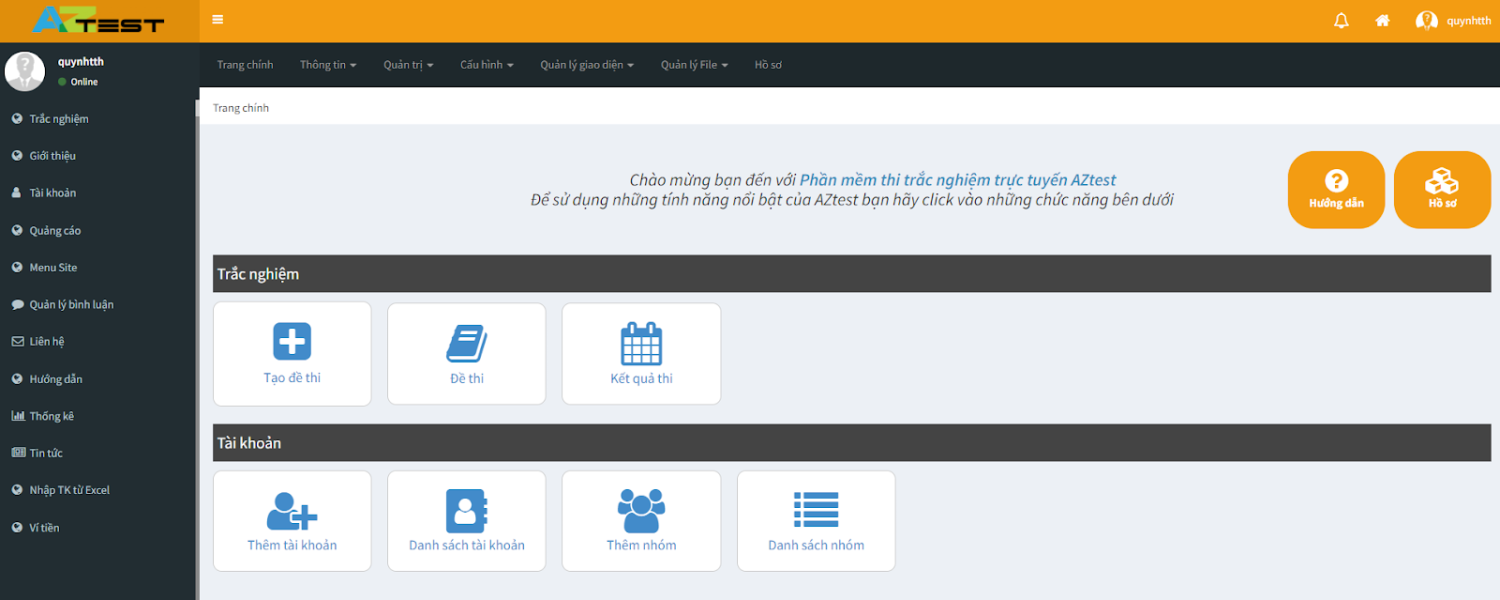
<p dir="ltr" style="text-align: justify;">Thay vì tạo đề thi trắc nghiệm một cách thủ công thì tại sao bạn không thử dùng <a href="https://aztest.vn/">phần mềm thi trắc nghiệm</a> để tạo đề thi, vừa đơn giản, hiệu quả lại tiết kiệm tối đa thời gian trong suốt quá trình tạo đề.&nbsp;</p>

<p dir="ltr" style="text-align: justify;">Không giống với việc tạo đề thi trắc nghiệm trên giấy, tạo đề thi trắc nghiệm online khác biệt hoàn toàn đặc biệt là về hình thức tạo đề. Khi sử dụng phần mềm tạo đề thi trắc nghiệm bắt buộc người dùng phải sử dụng thiết bị có kết nối internet để thực hiện các khâu từ soạn đề, trộn đề, tổ chức thi, chấm thi, xếp loại,...&nbsp;</p>

<div style="text-align:center">
<figure class="image" style="display:inline-block"><img alt="AZtest phần mềm tạo bài thi trắc nghiệm" height="320" src="https://aztest.vn/uploads/news/2022/aztest-phan-mem-tao-bai-thi-trac-nghiem.png" width="800" />
<figcaption><em>Sử dụng phần mềm thi trắc nghiệm để tạo bài thi trắc nghiệm</em></figcaption>
</figure>
</div>

<p dir="ltr" style="text-align: justify;">Như vậy, với phần mềm thi trắc nghiệm việc tạo đề trắc nghiệm sẽ trở nên đơn giản hơn, hiệu quả hơn. Hiện nay, có khá nhiều phần mềm thi trắc nghiệm trên thị trường được khách hàng tin dùng và sử dụng. Một trong số đó chính là <strong><a href="https://aztest.vn/">AZtest - Phần mềm thi trắc nghiệm online</a></strong> được phát triển trên nền tảng mã nguồn mở, đem đến giao diện thân thiện, bố cục hợp lý, giúp người sử dụng dễ dàng tạo đề thi trắc nghiệm.&nbsp;</p>

<p dir="ltr" style="text-align: justify;">Bên cạnh tính năng tạo đề thi trắc nghiệm online, AZtest còn hỗ trợ tính năng trộn đề, tính năng này cho phép người sử dụng có nhiều mã đề thi khác nhau từ một đề thi gốc được tạo ban đầu. Tính năng này sẽ giúp cho quá trình tổ chức thi đạt được kết quả cao, công bằng và minh bạch, tránh được tình trạng gian lận trong quá trình thi. Hiện tại, rất nhiều doanh nghiệp đã ứng dụng phần mềm thi trắc nghiệm AZtest vào quá trình tổ chức thi, đem lại kết quả tốt và nhận được phản hồi rất tốt từ phía người dùng trong quá trình sử dụng.&nbsp;</p>

<p dir="ltr" style="text-align: justify;">Một số doanh nghiệp sử dụng AZtest vào tổ chức thi đánh giá nhân viên như: Công ty cổ phần dược phẩm Nam Hà, Công ty Isuzu Việt Nam, Ngân hàng Agribank Lạng Sơn, Công ty môi giới BĐS King Broker Academy,...&nbsp;</p>

<p dir="ltr" style="text-align: justify;"><em><strong>&gt;&gt;&gt; Để biết thêm thông tin chi tiết về phần mềm trắc nghiệm AZtest bạn có thể liên hệ qua:</strong></em></p>

<ul>
	<li aria-level="1" dir="ltr">
	<p dir="ltr" role="presentation" style="text-align: justify;"><em>Hotline: <strong>0987.893.519&nbsp;</strong></em></p>
	</li>
	<li aria-level="1" dir="ltr">
	<p dir="ltr" role="presentation" style="text-align: justify;"><em>Website: <strong><a href="https://aztest.vn">https://aztest.vn</a>&nbsp;&nbsp;</strong></em></p>
	</li>
	<li aria-level="1" dir="ltr">
	<p dir="ltr" role="presentation" style="text-align: justify;"><em>Fanpage: <strong><a href="https://www.facebook.com/aztest.vn">https://www.facebook.com/aztest.vn</a>&nbsp;</strong></em></p>
	</li>
	<li aria-level="1" dir="ltr">
	<p dir="ltr" role="presentation" style="text-align: justify;"><em>Đăng ký trải nghiệm ngay tại đây:<strong> <a href="https://aztest.vn/saas/register/goi-trial/">https://aztest.vn/saas/register/goi-trial/</a>&nbsp;&nbsp;</strong></em></p>
	</li>
</ul>

<h2 dir="ltr" style="text-align: justify;">Tạo đề thi trắc nghiệm bằng Google Form&nbsp;</h2>

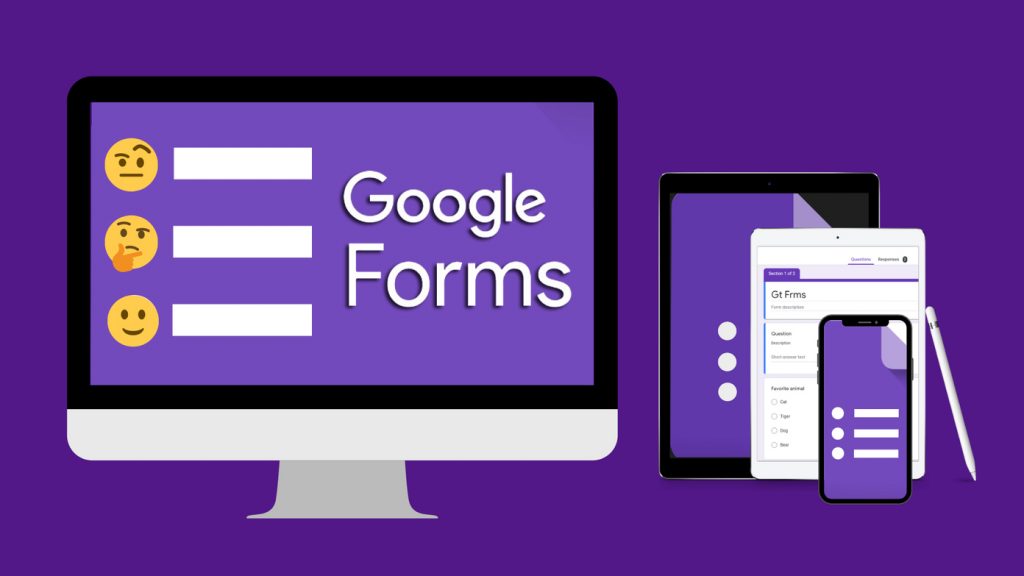
<p dir="ltr" style="text-align: justify;">Google Biểu mẫu (hay Google Forms) được biết đến là một ứng dụng web được nghiên cứu và phát triển bởi Google. Với Google Form người dùng có thể sử dụng để tạo bảng khảo sát, bảng câu hỏi,... ngay trên trình duyệt web của máy tính hoặc điện thoại. Với những tính năng hiện có, Google Form được đánh giá là một trong những công cụ hiệu quả giúp người sử dụng tạo bài thi trắc nghiệm online nhờ sự đơn giản, dễ dàng trong quá trình sử dụng.</p>

<div style="text-align:center">
<figure class="image" style="display:inline-block"><img alt="Sử dụng Google Form để tạo bài thi trắc nghiệm" height="450" src="https://aztest.vn/uploads/news/2022/su-dung-google-form-de-tao-bai-thi-trac-nghiem.jpg" width="800" />
<figcaption><em>Sử dụng Google Form để tạo bài thi trắc nghiệm</em></figcaption>
</figure>
</div>

<p dir="ltr" style="text-align: justify;">Tuy nhiên, chính sự đơn giản, dễ dùng lại không đem lại sự mong đợi cho những người sử dụng mong muốn có được một nền tảng tạo đề thi trắc nghiệm với những tính năng phức tạp hơn như câu hỏi chứa hình ảnh, video, file nghe, ghi âm câu trả lời,... Vậy nên, nếu bạn mong muốn có được một công cụ tạo bài thi trắc nghiệm với đầy đủ tính năng thì Google Forms không phải là sự lựa chọn hoàn hảo mà bạn nên sử dụng.&nbsp;</p>

<h2 dir="ltr" style="text-align: justify;">Tạo đề thi trắc nghiệm bằng file Excel&nbsp;</h2>

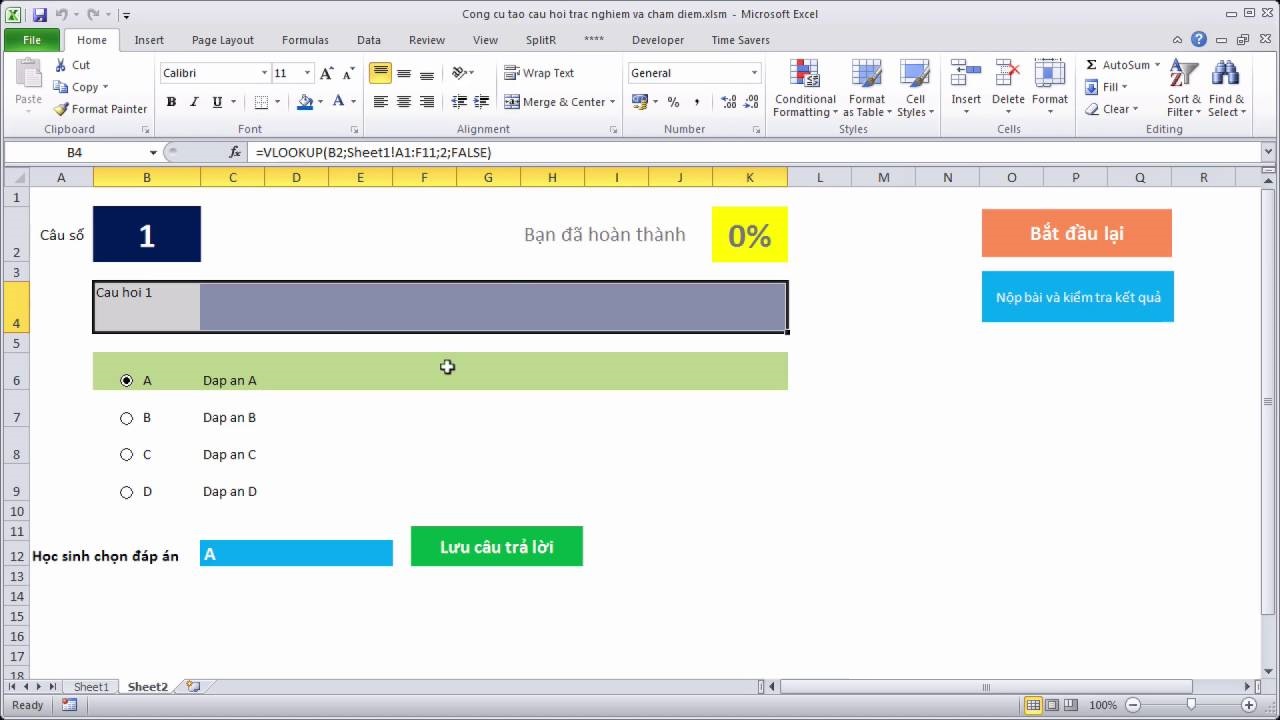
<p dir="ltr" style="text-align: justify;">Có thể bạn không biết tạo đề thi trắc nghiệm bằng file Excel cũng là một trong những cách tạo đề hiệu quả đem đến một bài thi trắc nghiệm hoàn hảo. Nếu eo hẹp về kinh phí, bạn có thể vận dụng các hàm của Excel để xây dựng bài thi trắc nghiệm, đơn giản, chính xác và có ngay kết quả sau khi làm bài thi. Để tạo bài thi trắc nghiệm bằng file Excel bạn hãy thực hiện theo các bước sau đây:</p>

<ul>
	<li aria-level="1" dir="ltr">
	<p dir="ltr" role="presentation" style="text-align: justify;"><u><strong>Bước 1</strong></u>: Tạo bảng tính chứa số báo danh, họ tên, lớp, khóa, bậc,…</p>
	</li>
	<li aria-level="1" dir="ltr">
	<p dir="ltr" role="presentation" style="text-align: justify;"><u><strong>Bước 2</strong></u>: Tạo câu hỏi</p>
	</li>
	<li aria-level="1" dir="ltr">
	<p dir="ltr" role="presentation" style="text-align: justify;"><u><strong>Bước 3</strong></u>: Tạo bảng bấm chọn Trả lời</p>
	</li>
	<li aria-level="1" dir="ltr">
	<p dir="ltr" role="presentation" style="text-align: justify;"><u><strong>Bước 4</strong></u>: Thiết lập hàm tính điểm</p>

	<ul>
		<li aria-level="2" dir="ltr">
		<p dir="ltr" role="presentation" style="text-align: justify;">Tại bảng chuẩn J2, bạn nhập =IF(C11=VLOOKUP(B11,$H$2: $I$66,2,0),1,0).</p>
		</li>
		<li aria-level="2" dir="ltr">
		<p dir="ltr" role="presentation" style="text-align: justify;">Sao chép công thức ô J2 tới các ô khác trong cột J.</p>
		</li>
		<li aria-level="2" dir="ltr">
		<p dir="ltr" role="presentation" style="text-align: justify;">Tại ô Kết quả G2 bạn nhập =SUM(J2:J91).</p>
		</li>
	</ul>
	</li>
</ul>

<div style="text-align:center">
<figure class="image" style="display:inline-block"><img alt="Tạo đề thi trắc nghiệm bằng file Excel" height="450" src="https://aztest.vn/uploads/news/2022/tao-de-thi-trac-nghiem-bang-file-excel.jpg" width="800" />
<figcaption><em>Tạo đề thi trắc nghiệm bằng file Excel&nbsp;</em></figcaption>
</figure>
</div>

<p dir="ltr" style="text-align: justify;">Mặc dù sử dụng file Excel có thể giúp bạn tạo được bài thi trắc nghiệm. Tuy nhiên, quá trình tạo đề lại mất nhiều thời gian, công sức, dễ sai sót trong quá trình tạo để sẽ làm lỗi cả bài thi trắc nghiệm. Chưa kể đến việc tạo đề bằng file Excel không thể áp dụng để tổ chức thi với số lượng người dự thi lớn, khó kiểm soát và mất thời gian, không đem lại kết quả cao trong quá trình thi. Do đó, người sử dụng cần cân nhắc khi dùng file Excel để tạo bài thi trắc nghiệm.&nbsp;</p>

<p dir="ltr" style="text-align: justify;">Trên đây là 3 cách tạo đề thi trắc nghiệm bạn không thể không biết mà AZtest muốn chia sẻ đến bạn đọc. Tùy vào từng trường hợp mà bạn nên áp dụng cách tạo đề nào cho phù hợp, tuy nhiên để tiết kiệm thời gian, chi phí và hạn chế sai sót chúng tôi khuyên bạn nên sử dụng phần mềm thi trắc nghiệm trong quá trình tổ chức thi trắc nghiệm đánh giá trong doanh nghiệp mình.&nbsp;</p>

<p dir="ltr" style="text-align: justify;"><em><strong>&gt;&gt;&gt; XEM THÊM: <a href="https://aztest.vn/huong-dan-su-dung/huong-dan-tao-de-thi-tren-he-thong-trac-nghiem-aztest-28.html">Hướng dẫn tạo đề thi trên hệ thống trắc nghiệm AZtest</a></strong></em></p>

<p dir="ltr" style="text-align: justify;"><div align="justify"><span style="font-size:14px;"><span style="line-height:107%"><span style="font-family:Arial,sans-serif">--------------------------------------------<br />
AZtest là hệ thống tạo lập website thi trắc nghiệm trực tuyến do</span></span><span style="font-family:Arial,Helvetica,sans-serif;">&nbsp;<strong><a href="https://tdfoss.vn/">CÔNG TY CỔ PHẦN&nbsp;TDFOSS</a>&nbsp;</strong>phát triển.</span><span style="line-height:107%"><span style="font-family:Arial,sans-serif">&nbsp;Với AZtest, người dùng có thể dễ dàng sở hữu một website tổ chức ôn tập, thi trắc nghiệm trực tuyến hoàn toàn miễn phí, độc lập, được cá nhân hóa theo yêu cầu của người quản trị.</span></span></span><br />
<span style="font-family: Arial, Helvetica, sans-serif; font-size: 14px;">Liên hệ hotline&nbsp;</span><strong style="font-family: Arial, Helvetica, sans-serif; font-size: 14px;">0987.893.519 </strong><span style="font-family: Arial, Helvetica, sans-serif; font-size: 14px;">hoặc Fanpage </span><a href="https://fb.me/aztest.vn" style="font-family: Arial, Helvetica, sans-serif; font-size: 14px;"><strong>https://m.me/aztest.vn</strong></a><span style="font-family: Arial, Helvetica, sans-serif; font-size: 14px;">&nbsp;</span><span style="font-family: Arial, Helvetica, sans-serif; font-size: 14px;">để được tư vấn trực tiếp bởi đội ngũ kỹ thuật viên của AZtest.</span></div></p>
		</div>
	</div>
	<div id="footer" class="clearfix">
		<div id="url">
			<strong>URL của bản tin này: </strong><a href="https://aztest.vn/tin-tuc/savefile/tin-doanh-nghiep/3-cach-tao-de-thi-trac-nghiem-ban-khong-the-khong-biet-891.html" title="3 cách tạo đề thi trắc nghiệm bạn không thể không biết">https://aztest.vn/tin-tuc/savefile/tin-doanh-nghiep/3-cach-tao-de-thi-trac-nghiem-ban-khong-the-khong-biet-891.html</a>

		</div>
		<div class="clear"></div>
		<div class="copyright">
			&copy; Hệ thống tạo lập website thi trắc nghiệm trực tuyến AZtest
		</div>
		<div id="contact">
			<a href="mailto:contact@aztest.vn">contact@aztest.vn</a>
		</div>
	</div>
</div>
        <div id="timeoutsess" class="chromeframe">
            Bạn đã không sử dụng Site, <a onclick="timeoutsesscancel();" href="https://aztest.vn/#">Bấm vào đây để duy trì trạng thái đăng nhập</a>. Thời gian chờ: <span id="secField"> 60 </span> giây
        </div>
        <div id="openidResult" class="nv-alert" style="display:none"></div>
        <div id="openidBt" data-result="" data-redirect=""></div>
<script src="https://aztest.vn/assets/js/jquery/jquery.min.js"></script>
<script>var nv_base_siteurl="/",nv_lang_data="vi",nv_lang_interface="vi",nv_name_variable="nv",nv_fc_variable="op",nv_lang_variable="language",nv_module_name="tin-tuc",nv_func_name="savefile",nv_is_user=0, nv_my_ofs=-4,nv_my_abbr="EDT",nv_cookie_prefix="nv4c_p74o3",nv_check_pass_mstime=28738000,nv_area_admin=0,nv_safemode=0,theme_responsive=1,nv_recaptcha_ver=2,nv_recaptcha_sitekey="6LemcGUUAAAAAPjkX78IcNaDnVwr5S9dVb-mGciG",nv_recaptcha_type="image",XSSsanitize=1;</script>
<script src="https://aztest.vn/assets/js/language/vi.js"></script>
<script src="https://aztest.vn/assets/js/DOMPurify/purify.js"></script>
<script src="https://aztest.vn/assets/js/global.js"></script>
<script src="https://aztest.vn/assets/js/site.js"></script>
<script src="https://aztest.vn/themes/tdfoss/js/news.js"></script>
<script src="https://aztest.vn/themes/tdfoss/js/main.js"></script>
<script src="https://aztest.vn/themes/tdfoss/js/custom.js"></script>
<script>
			!function(f,b,e,v,n,t,s)
			{if(f.fbq)return;n=f.fbq=function(){n.callMethod?
			n.callMethod.apply(n,arguments):n.queue.push(arguments)};
			if(!f._fbq)f._fbq=n;n.push=n;n.loaded=!0;n.version='2.0';
			n.queue=[];t=b.createElement(e);t.async=!0;
			t.src=v;s=b.getElementsByTagName(e)[0];
			s.parentNode.insertBefore(t,s)}(window, document,'script',
			'https://connect.facebook.net/en_US/fbevents.js');
			fbq('init', '496798233988223');
			fbq('track', 'PageView');
		</script>
<script src="https://sp.zalo.me/plugins/sdk.js"></script>
<script src="https://aztest.vn/themes/default/js/bootstrap.min.js"></script>
<script src="https://aztest.vn/themes/tdfoss/assets/javascripts/plugins/hover_dropdown/twitter-bootstrap-hover-dropdown.min.js"></script>
<script src="https://aztest.vn/themes/tdfoss/assets/javascripts/jednotka.js"></script>
</body>
</html>