<!DOCTYPE html>
	<html lang="vi" xmlns="http://www.w3.org/1999/xhtml" prefix="og: http://ogp.me/ns#">
	<head>
<title>Mẹo và quy tắc khi soạn đề file Word</title>
<meta name="description" content="Mẹo và quy tắc khi soạn đề file Word - Savefile - Tin Tức - https&#x3A;&#x002F;&#x002F;aztest.vn&#x002F;tin-tuc&#x002F;savefile&#x002F;thong-bao&#x002F;meo-va-quy-tac-khi-soan-de-file-word-449.html">
<meta name="author" content="Hệ thống tạo lập website thi trắc nghiệm trực tuyến AZtest">
<meta name="copyright" content="Hệ thống tạo lập website thi trắc nghiệm trực tuyến AZtest &#91;contact@aztest.vn&#93;">
<meta name="robots" content="index, archive, follow, noodp">
<meta name="googlebot" content="index,archive,follow,noodp">
<meta name="msnbot" content="all,index,follow">
<meta name="google-site-verification" content="J8NLMWE1t_6pzg78DzZTx_0EUz1Akr0iZg7kSM4todQ">
<meta name="yandex-verification" content="7d414f155f86e0ef">
<meta name="generator" content="NukeViet v4.5">
<meta name="viewport" content="width=device-width, initial-scale=1">
<meta http-equiv="Content-Type" content="text/html; charset=utf-8">
<meta property="fb:pages" content="693366270865546">
<meta property="fb:app_id" content="257919581378885">
<meta property="og:title" content="Mẹo và quy tắc khi soạn đề file Word">
<meta property="og:type" content="website">
<meta property="og:description" content="Savefile - Tin Tức - https&#x3A;&#x002F;&#x002F;aztest.vn&#x002F;tin-tuc&#x002F;savefile&#x002F;thong-bao&#x002F;meo-va-quy-tac-khi-soan-de-file-word-449.html">
<meta property="og:site_name" content="Hệ thống tạo lập website thi trắc nghiệm trực tuyến AZtest">
<meta property="og:url" content="https://aztest.vn/tin-tuc/savefile/thong-bao/meo-va-quy-tac-khi-soan-de-file-word-449.html">
<link rel="shortcut icon" href="https://aztest.vn/uploads/favicon_256_256.png">
<link rel="canonical" href="https://aztest.vn/tin-tuc/savefile/thong-bao/meo-va-quy-tac-khi-soan-de-file-word-449.html">
<link rel="alternate" href="https://aztest.vn/tin-tuc/rss/" title="Tin Tức" type="application/rss+xml">
<link rel="alternate" href="https://aztest.vn/tin-tuc/rss/thong-bao/" title="Tin Tức - Thông báo" type="application/rss+xml">
<link rel="alternate" href="https://aztest.vn/tin-tuc/rss/tin-giao-duc/" title="Tin Tức - Tin giáo dục" type="application/rss+xml">
<link rel="alternate" href="https://aztest.vn/tin-tuc/rss/tin-doanh-nghiep/" title="Tin Tức - Tin Doanh Nghiệp" type="application/rss+xml">
<link rel="alternate" href="https://aztest.vn/tin-tuc/rss/huong-dan-su-dung/" title="Tin Tức - Hướng dẫn sử dụng" type="application/rss+xml">
<link rel="StyleSheet" href="https://aztest.vn/assets/css/font-awesome.min.css">
<link rel="StyleSheet" href="https://aztest.vn/themes/default/css/bootstrap.min.css">
<link rel="StyleSheet" href="https://aztest.vn/themes/tdfoss/assets/stylesheets/jednotka_green.css">
<link rel="StyleSheet" href="https://aztest.vn/themes/tdfoss/css/style.css">
<link rel="StyleSheet" href="https://aztest.vn/themes/tdfoss/css/td.css">
<link rel="StyleSheet" href="https://aztest.vn/themes/tdfoss/css/news.css">
<link rel="stylesheet" href="https://aztest.vn/themes/tdfoss/css/custom.css">
<link rel="StyleSheet" href="https://aztest.vn/assets/css/tdfoss.vi.0.css?t=1747300712">
<link rel="StyleSheet" href="https://aztest.vn/themes/tdfoss/css/td-new.css">
<style>
	body{background: #fff;}
</style>
	    <!--[if lt IE 9]>
	      <script src="https://aztest.vn/themes/tdfoss/assets/javascripts/ie/html5shiv.js" type="text/javascript"></script>
	      <script src="https://aztest.vn/themes/tdfoss/assets/javascripts/ie/respond.min.js" type="text/javascript"></script>
	    <![endif]-->
<script>(function(i,s,o,g,r,a,m){i['GoogleAnalyticsObject']=r;i[r]=i[r]||function(){
(i[r].q=i[r].q||[]).push(arguments)},i[r].l=1*new Date();a=s.createElement(o),
m=s.getElementsByTagName(o)[0];a.async=1;a.src=g;m.parentNode.insertBefore(a,m)
})(window,document,'script','https://www.google-analytics.com/analytics.js','ga');
ga('create', 'UA-53105817-9', '.aztest.vn');
ga('send', 'pageview');
</script>
</head>
	<body class="">
		<noscript><img height="1" width="1" style="display:none" src="https://www.facebook.com/tr?id=496798233988223&ev=PageView&noscript=1" alt="fb-src"/></noscript>
<div id="print">
	<div id="hd_print">
		<h2 class="pull-left">Hệ thống tạo lập website thi trắc nghiệm trực tuyến AZtest</h2>
		<p class="pull-right"><a title="Hệ thống tạo lập website thi trắc nghiệm trực tuyến AZtest" href="https://aztest.vn/">https://aztest.vn</a></p>
	</div>
	<div class="clear"></div>
	<hr />
	<div id="content">
		<h1>Mẹo và quy tắc khi soạn đề file Word</h1>
		<ul class="list-inline">
			<li>Thứ sáu - 10/04/2020 09:10</li>
			<li class="hidden-print txtrequired"><em class="fa fa-print">&nbsp;</em><a title="In ra" href="javascript:;" onclick="window.print()">In ra</a></li>
			<li class="hidden-print txtrequired"><em class="fa fa-power-off">&nbsp;</em><a title="Đóng cửa sổ này" href="javascript:;" onclick="window.close()">Đóng cửa sổ này</a></li>
		</ul>
		<div class="clear"></div>
		<div id="hometext">
			Bạn đang gặp khó khăn khi soạn đề file Word, điều này làm bạn mất nhiều thời gian trong quá trình soạn đề? Với những mẹo và quy tắc khi soạn đề file Word mà Aztest chia sẻ đến bạn trong bài viết sau đây sẽ giúp bạn giải quyết nhanh nỗi lo của mình. Theo dõi ngay để biết được những quy tắc đó là gì?
		</div>
				<div class="imghome">
			<img alt="Aztest phần mềm thi trắc nghiệm trực tuyến với những tính năng nổi bật" src="https://aztest.vn/uploads/news/2020/az.jpg" width="460" class="img-thumbnail" />
						<p>
				<em>Aztest phần mềm thi trắc nghiệm trực tuyến với những tính năng nổi bật</em>
			</p>
		</div>
		<div class="clear"></div>
		<div id="bodytext" class="clearfix">
			<h2 dir="ltr"><strong>1. Những tính năng hữu ích từ phần mềm thi trắc nghiệm Aztest</strong></h2>

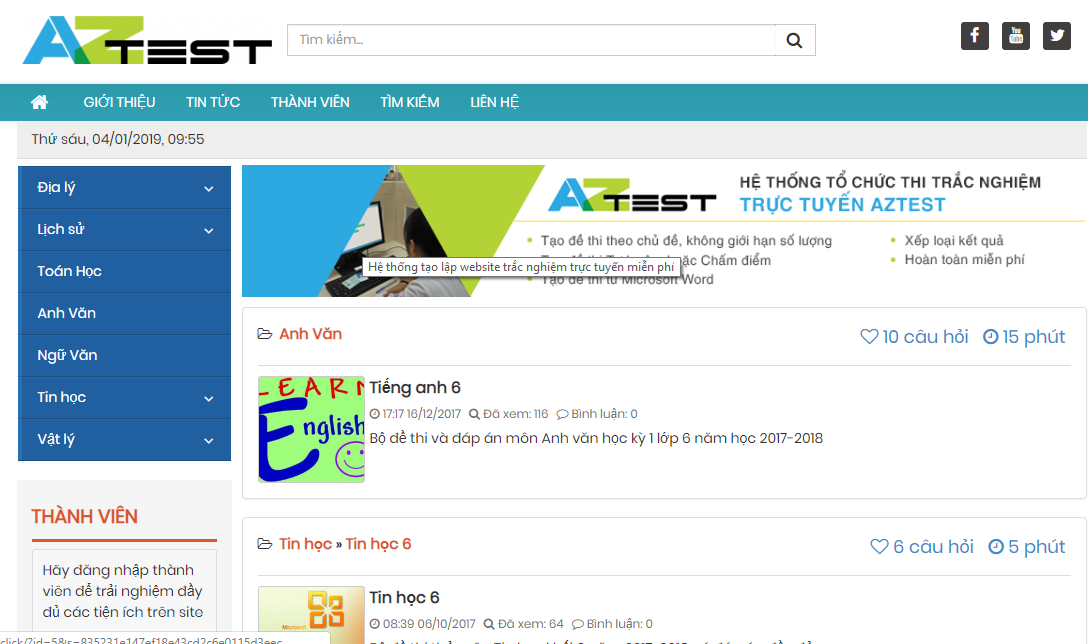
<p dir="ltr"><span style="font-size:14px;"><span style="font-family:Arial,Helvetica,sans-serif;">Là một trong số những phần mềm thi trắc nghiệm hữu ích dành cho các cá nhân, tổ chức, doanh nghiệp có nhu cầu, đáp ứng được những mong muốn của người dùng trong suốt quá trình sử dụng.</span></span></p>

<div style="text-align:center">
<figure class="image" style="display:inline-block"><img alt="aztest" height="355" src="https://aztest.vn/uploads/news/2020/1_3.png" width="600" />
<figcaption><em>Aztest phần mềm hỗ trợ những tính năng hữu ích cho người dùng trong quá trình sử dụng</em></figcaption>
</figure>
</div>

<p dir="ltr" style="text-align: justify;"><span style="font-size:14px;"><span style="font-family:Arial,Helvetica,sans-serif;">Đến với Aztest bạn có thể tạo lập cho mình một website thi trực tuyến riêng, sau đó cá nhân hóa website theo sở thích của mình, với màu sắc giao diện, logo và tên miền theo mình. Đây cũng là điểm khác biệt của Aztest so với những phần mềm khác.&nbsp;</span></span></p>

<p dir="ltr" style="text-align: justify;"><span style="font-size:14px;"><span style="font-family:Arial,Helvetica,sans-serif;">Ngoài ra, khi sử dụng Aztest còn cung cấp cho người dùng những tính năng vượt trội khác như:</span></span></p>

<ul>
	<li dir="ltr">
	<p dir="ltr" role="presentation" style="text-align: justify;"><span style="font-size:14px;"><span style="font-family:Arial,Helvetica,sans-serif;">Tạo đề thi theo nhóm và chủ đề, không giới hạn</span></span></p>
	</li>
	<li dir="ltr">
	<p dir="ltr" role="presentation" style="text-align: justify;"><span style="font-size:14px;"><span style="font-family:Arial,Helvetica,sans-serif;">Cho phép Import đề thi từ Microsoft Word</span></span></p>
	</li>
	<li dir="ltr">
	<p dir="ltr" role="presentation" style="text-align: justify;"><span style="font-size:14px;"><span style="font-family:Arial,Helvetica,sans-serif;">Phân quyền quản lý thư viện đề thi</span></span></p>
	</li>
	<li dir="ltr">
	<p dir="ltr" role="presentation" style="text-align: justify;"><span style="font-size:14px;"><span style="font-family:Arial,Helvetica,sans-serif;">Phân quyền thành viên tham gia làm bài</span></span></p>
	</li>
	<li dir="ltr">
	<p dir="ltr" role="presentation" style="text-align: justify;"><span style="font-size:14px;"><span style="font-family:Arial,Helvetica,sans-serif;">Tạo đề thi Tự luyện, hoặc Chấm điểm</span></span></p>
	</li>
	<li dir="ltr">
	<p dir="ltr" role="presentation" style="text-align: justify;"><span style="font-size:14px;"><span style="font-family:Arial,Helvetica,sans-serif;">Thêm hình ảnh, video, file âm thanh minh họa dễ dàng</span></span></p>
	</li>
	<li dir="ltr">
	<p dir="ltr" role="presentation" style="text-align: justify;"><span style="font-size:14px;"><span style="font-family:Arial,Helvetica,sans-serif;">Cấu hình thang điểm, thời gian làm bài</span></span></p>
	</li>
	<li dir="ltr">
	<p dir="ltr" role="presentation" style="text-align: justify;"><span style="font-size:14px;"><span style="font-family:Arial,Helvetica,sans-serif;">Xem lại lịch sử thi của học sinh</span></span></p>
	</li>
	<li dir="ltr">
	<p dir="ltr" role="presentation" style="text-align: justify;"><span style="font-size:14px;"><span style="font-family:Arial,Helvetica,sans-serif;">Xếp loại kết quả học sinh tham gia</span></span></p>
	</li>
	<li dir="ltr">
	<p dir="ltr" role="presentation" style="text-align: justify;"><span style="font-size:14px;"><span style="font-family:Arial,Helvetica,sans-serif;">Hiển thị ngẫu nhiên câu hỏi và đáp án dựa trên đề gốc</span></span></p>
	</li>
	<li dir="ltr">
	<p dir="ltr" role="presentation" style="text-align: justify;"><span style="font-size:14px;"><span style="font-family:Arial,Helvetica,sans-serif;">Bộ đếm ngược thời gian làm bài, tự động thu bài khi hết giờ.</span></span></p>
	</li>
</ul>

<p dir="ltr" style="text-align: justify;"><span style="font-size:14px;"><span style="font-family:Arial,Helvetica,sans-serif;">Đặc biệt với tính năng Import đề thi từ Microsoft Word mà Aztest cung cấp giúp người dùng soạn đề ngay trên file word, từ đó rút ngắn được thời gian soạn đề hiệu quả. Đây là một trong những điểm nổi bật mà Aztest muốn gửi đến người dùng.&nbsp;</span></span></p>

<h2 dir="ltr"><strong>2. Quy tắc khi soạn đề file Word</strong></h2>

<p dir="ltr"><span style="font-size:14px;"><span style="font-family:Arial,Helvetica,sans-serif;">Trong quá trình soạn đề thi trên file word để đăng tải lên phần mềm Aztest bạn cần chú ý đến một số quy tắc sau đây để quá trình soạn bài được dễ dàng hơn. Cụ thể:</span></span></p>

<h3 dir="ltr"><strong>Đối với các môn thông thường</strong></h3>

<ul>
	<li dir="ltr">
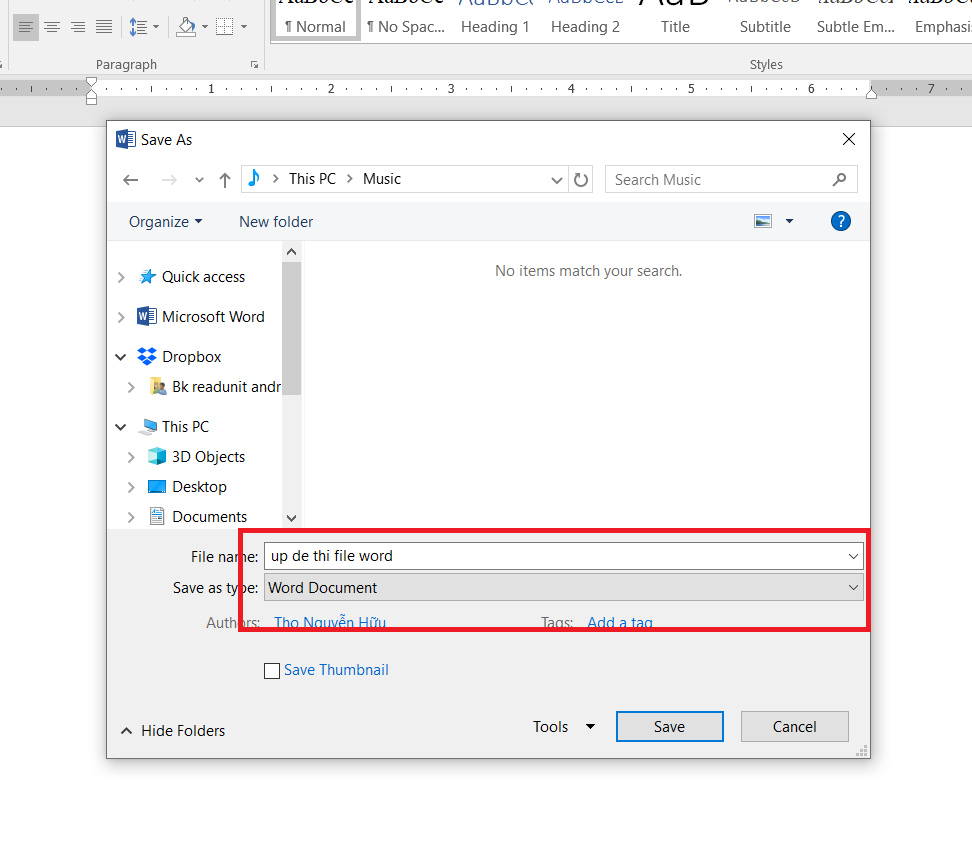
	<p dir="ltr" role="presentation"><span style="font-size:14px;"><span style="font-family:Arial,Helvetica,sans-serif;">Khi lưu bài trên file Word bạn nên định dạng file có đuôi là .docx (không được định dạng .doc), để chuyển .doc sang .docx bạn chỉ cần Save as (ấn nút F12) -&gt; Save as type là .docx (cái đầu tiên)</span></span></p>
	</li>
</ul>

<div style="text-align:center">
<figure class="image" style="display:inline-block"><img alt="Hình 2.1: Lưu file đề thi với dạng file .docx" height="531" src="https://lh4.googleusercontent.com/3jtbxf3LqJpeGukR7EDFGYjedC6Ry1vqsHu7cNwk_DayWqJucRsrh4Hh_HxMMx6kpOsdWqUsqRX_zrXp9h5KuLSqPMBuctdtT0woZ3uxHCN-Kblu_uM8mgN9TIvltS3YoGkKk4j9" width="602" />
<figcaption><em>Hình 2.1: Lưu file đề thi với dạng file .docx</em></figcaption>
</figure>
</div>

<ul>
	<li dir="ltr">
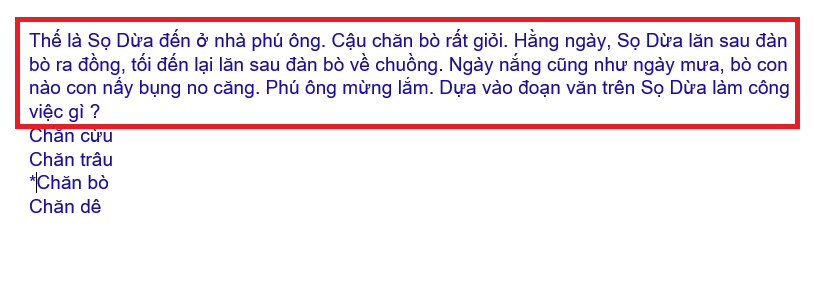
	<p dir="ltr" role="presentation" style="text-align: justify;"><span style="font-size:14px;"><span style="font-family:Arial,Helvetica,sans-serif;">Lời dẫn đề phải là 1 dòng hoặc 1 đoạn và khi soạn không được enter xuống dòng (nếu muốn xuống dòng thì chỉnh sửa thủ công sau trên hệ thống sau khi đăng tải xong).</span></span></p>
	</li>
	<li style="text-align: justify;">
	<p><span style="font-size:14px;"><span style="font-family:Arial,Helvetica,sans-serif;">Mỗi đáp án là 1 dòng (hoặc 1 đoạn miễn là không được enter xuống dòng), trước đáp án đúng có * (không cần phải ghi Câu 1, Câu 2,... và A... B... C... D...).</span></span></p>
	</li>
	<li dir="ltr">
	<p dir="ltr" role="presentation" style="text-align: justify;"><span style="font-size:14px;"><span style="font-family:Arial,Helvetica,sans-serif;">Mỗi câu cách nhau 1 enter (không được có dấu cách hoặc bất cứ ký tự gì trước).</span></span></p>
	</li>
</ul>

<div style="text-align:center">
<figure class="image" style="display:inline-block"><img alt="Hình 2.2: Cách soạn tên câu hỏi, đáp án" height="220" src="https://lh4.googleusercontent.com/oVqqAyPBD_jTa4KNmfu1gaZCOUorUP2bWAb9aFDVnSEFexOdnT7SqNU7IGeFvAFtcrwhxXYs1wVLgU3ERn5GiHjbvr1P53fxOLYMCF_CeAKCrwhJo7ct9C-f2oGmdhd6dhb6GRim" width="602" />
<figcaption><em>Hình 2.2: Cách soạn tên câu hỏi, đáp án</em></figcaption>
</figure>
</div>

<p dir="ltr" style="text-align: justify;">&nbsp;</p>

<ul dir="ltr">
	<li style="text-align: justify;">
	<p><span style="font-size:14px;"><span style="font-family:Arial,Helvetica,sans-serif;">Đối với các bảng trong file Word khi soạn bạn phải chuyển sang dạng hình ảnh và lưu đuôi .jpg hoặc .png. Bạn chỉ cần chọn bảng trong Word sau đó crop đi và lưu lại rồi copy và paste sang Paint và lưu lại rồi insert lại Word là được (lưu ý không được chụp màn hình rồi paste trực tiếp trên Word và crop như thế sẽ bị lỗi khi đăng lên phần mềm).Hình ảnh phải ở ngay phía sau câu hỏi ( có thể hiển thị sẽ khó nhìn, người dùng sẽ chỉnh sửa sau khi up đề lên)</span></span></p>
	</li>
</ul>

<div style="text-align:center">
<figure class="image" style="display:inline-block"><img alt="Hình 2.3: Cách soạn thảo câu hỏi có hình ảnh" height="459" src="https://lh5.googleusercontent.com/hEI0g82P2NMnCmnBGfKA6q0eC95xPxNdcwpHbNnjXNxJWqQbMw2mpDE3zeuwRkaWiO-4kfG08TlU7-Xmjps1UuDIAY66HmnjaJRnhVW3Drz7z97HQSF6mTW18Hq6ySNG1G7XiDMx" width="602" />
<figcaption><em>Hình 2.3: Cách soạn thảo câu hỏi có hình ảnh</em></figcaption>
</figure>
</div>

<ul>
	<li dir="ltr">
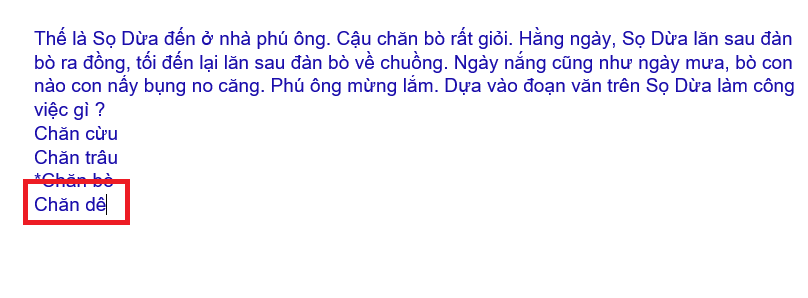
	<p dir="ltr" role="presentation" style="text-align: justify;"><span style="font-size:14px;"><span style="font-family:Arial,Helvetica,sans-serif;">Sau câu cuối cùng không được thêm bất cứ dòng nào hết (đẩy chuột xuống và xóa hết đến đáp án cuối cùng).</span></span></p>
	</li>
</ul>

<div style="text-align:center">
<figure class="image" style="display:inline-block"><img alt="Hình 2.4: Quy định dấu kết thúc câu hỏi" height="223" src="https://lh6.googleusercontent.com/Aej3IKJ-T8-qeeDPogDg3NAkngK0WpCpgtT85aB7sN6ROE35oxeQx01m5DQL9vm6YDGhiICsouBCYxBOepMaf9MBFzXNPyhqMuwhC_C79fXEITk763gynfegNcG6wuOqO0Yry54C" width="602" />
<figcaption><em>Hình 2.4: Quy định dấu kết thúc câu hỏi</em></figcaption>
</figure>
</div>

<p dir="ltr"><strong>Đối với môn Toán, Lý</strong></p>

<ul>
	<li dir="ltr">
	<p dir="ltr" role="presentation" style="text-align: justify;"><span style="font-size:14px;"><span style="font-family:Arial,Helvetica,sans-serif;">Đồ thị phải là file hình ảnh tức đuôi .jpg hoặc .png (nhớ phải kiểm tra kỹ vì mặc dù đã Toggle TeX nhưng 1 số chữ như |R hay đồ thị vẫn ở dạng Mathtype, bấm chuột vào nhìn là biết ngay ảnh hay Mathtype). Nhìn chung phải là LaTex hết nếu không sẽ bị lỗi khi đăng tải lên phần mềm.&nbsp;</span></span></p>
	</li>
</ul>

<div style="text-align:center">
<figure class="image" style="display:inline-block"><img alt="Hình 2.4: Một số lưu ý đối với đề thi có công thức toán học" height="560" src="https://lh3.googleusercontent.com/c7zBj3WStOImEY4SF8qbmGU50tWHPm8Zmio9oQAVUImv0UNA6ZpXH1Tw_ofBWnYLK6AZK7_x1_WnthcIGlQg8cSknccwATVDu2Uph8fH1t-Bl779s5sMr_TFWFsTwLXuMmKdkLgp" width="602" />
<figcaption>Hình 2.4: Một số lưu ý đối với đề thi có công thức toán học</figcaption>
</figure>
</div>

<ul dir="ltr">
	<li style="text-align: justify;">
	<p><span style="font-size:14px;"><span style="font-family:Arial,Helvetica,sans-serif;">Khi Xem Trước (lúc upload) nếu thấy lỗi 1 số công thức không hiển thị (thỉnh thoảng bị 1 vài cái, thường 1 đề bị 1, 2 cái) thì mở file Word lên xóa $ ở đầu công thức đó đi hoặc thêm $ vào hoặc xóa &#91;&#93;, \ ở đầu đi rồi Upload lại là OK.</span></span></p>
	</li>
</ul>

<p dir="ltr" style="text-align: justify;"><span style="font-size:14px;"><span style="font-family:Arial,Helvetica,sans-serif;">Trên đây là một số mẹo và quy tắc khi soạn đề file Word. Hy vọng rằng những thông tin trên sẽ giúp ích cho bạn ít nhiều trong quá trình soạn đề thi. Chúc bạn thành công!</span></span></p>

<p dir="ltr" style="text-align: justify;"><span style="font-size:14px;"><span style="font-family:Arial,Helvetica,sans-serif;">Nếu có điều gì thắc mắc trong quá trình tạo đề bạn hãy liên hệ ngay với <strong><a href="https://aztest.vn/">Aztest</a></strong> theo số hotline <span style="color:rgb(231, 76, 60);"><strong>0987.893.519</strong></span> (ext 3) để được nhân viên hỗ trợ tận tình.&nbsp;</span></span></p>

<p dir="ltr" style="text-align: justify;"><strong><span style="font-size:14px;"><span style="font-family:Arial,Helvetica,sans-serif;">&gt;&gt;&gt; XEM THÊM: <a href="https://aztest.vn/tin-tuc/thong-bao/huong-dan-nang-cap-goi-dich-vu-dang-su-dung-tren-aztest-445.html">Hướng dẫn nâng cấp gói dịch vụ đang sử dụng trên Aztes</a>t</span></span></strong></p>

<p dir="ltr" style="text-align: justify;"><span style="font-size:14px;"><span style="font-family:Arial,Helvetica,sans-serif;"><div align="justify"><span style="font-size:14px;"><span style="line-height:107%"><span style="font-family:Arial,sans-serif">--------------------------------------------<br />
AZtest là hệ thống tạo lập website thi trắc nghiệm trực tuyến do</span></span><span style="font-family:Arial,Helvetica,sans-serif;">&nbsp;<strong><a href="https://tdfoss.vn/">CÔNG TY CỔ PHẦN&nbsp;TDFOSS</a>&nbsp;</strong>phát triển.</span><span style="line-height:107%"><span style="font-family:Arial,sans-serif">&nbsp;Với AZtest, người dùng có thể dễ dàng sở hữu một website tổ chức ôn tập, thi trắc nghiệm trực tuyến hoàn toàn miễn phí, độc lập, được cá nhân hóa theo yêu cầu của người quản trị.</span></span></span><br />
<span style="font-family: Arial, Helvetica, sans-serif; font-size: 14px;">Liên hệ hotline&nbsp;</span><strong style="font-family: Arial, Helvetica, sans-serif; font-size: 14px;">0987.893.519 </strong><span style="font-family: Arial, Helvetica, sans-serif; font-size: 14px;">hoặc Fanpage </span><a href="https://fb.me/aztest.vn" style="font-family: Arial, Helvetica, sans-serif; font-size: 14px;"><strong>https://m.me/aztest.vn</strong></a><span style="font-family: Arial, Helvetica, sans-serif; font-size: 14px;">&nbsp;</span><span style="font-family: Arial, Helvetica, sans-serif; font-size: 14px;">để được tư vấn trực tiếp bởi đội ngũ kỹ thuật viên của AZtest.</span></div></span></span></p>
		</div>
	</div>
	<div id="footer" class="clearfix">
		<div id="url">
			<strong>URL của bản tin này: </strong><a href="https://aztest.vn/tin-tuc/savefile/thong-bao/meo-va-quy-tac-khi-soan-de-file-word-449.html" title="Mẹo và quy tắc khi soạn đề file Word">https://aztest.vn/tin-tuc/savefile/thong-bao/meo-va-quy-tac-khi-soan-de-file-word-449.html</a>

		</div>
		<div class="clear"></div>
		<div class="copyright">
			&copy; Hệ thống tạo lập website thi trắc nghiệm trực tuyến AZtest
		</div>
		<div id="contact">
			<a href="mailto:contact@aztest.vn">contact@aztest.vn</a>
		</div>
	</div>
</div>
        <div id="timeoutsess" class="chromeframe">
            Bạn đã không sử dụng Site, <a onclick="timeoutsesscancel();" href="https://aztest.vn/#">Bấm vào đây để duy trì trạng thái đăng nhập</a>. Thời gian chờ: <span id="secField"> 60 </span> giây
        </div>
        <div id="openidResult" class="nv-alert" style="display:none"></div>
        <div id="openidBt" data-result="" data-redirect=""></div>
<div id="run_cronjobs" style="visibility:hidden;display:none;"><img alt="cron" src="/index.php?second=cronjobs&amp;p=g75UmtxD" width="1" height="1" /></div>
<script src="https://aztest.vn/assets/js/jquery/jquery.min.js"></script>
<script>var nv_base_siteurl="/",nv_lang_data="vi",nv_lang_interface="vi",nv_name_variable="nv",nv_fc_variable="op",nv_lang_variable="language",nv_module_name="tin-tuc",nv_func_name="savefile",nv_is_user=0, nv_my_ofs=-4,nv_my_abbr="EDT",nv_cookie_prefix="nv4c_p74o3",nv_check_pass_mstime=28738000,nv_area_admin=0,nv_safemode=0,theme_responsive=1,nv_recaptcha_ver=2,nv_recaptcha_sitekey="6LemcGUUAAAAAPjkX78IcNaDnVwr5S9dVb-mGciG",nv_recaptcha_type="image",XSSsanitize=1;</script>
<script src="https://aztest.vn/assets/js/language/vi.js"></script>
<script src="https://aztest.vn/assets/js/DOMPurify/purify.js"></script>
<script src="https://aztest.vn/assets/js/global.js"></script>
<script src="https://aztest.vn/assets/js/site.js"></script>
<script src="https://aztest.vn/themes/tdfoss/js/news.js"></script>
<script src="https://aztest.vn/themes/tdfoss/js/main.js"></script>
<script src="https://aztest.vn/themes/tdfoss/js/custom.js"></script>
<script>
			!function(f,b,e,v,n,t,s)
			{if(f.fbq)return;n=f.fbq=function(){n.callMethod?
			n.callMethod.apply(n,arguments):n.queue.push(arguments)};
			if(!f._fbq)f._fbq=n;n.push=n;n.loaded=!0;n.version='2.0';
			n.queue=[];t=b.createElement(e);t.async=!0;
			t.src=v;s=b.getElementsByTagName(e)[0];
			s.parentNode.insertBefore(t,s)}(window, document,'script',
			'https://connect.facebook.net/en_US/fbevents.js');
			fbq('init', '496798233988223');
			fbq('track', 'PageView');
		</script>
<script src="https://sp.zalo.me/plugins/sdk.js"></script>
<script src="https://aztest.vn/themes/default/js/bootstrap.min.js"></script>
<script src="https://aztest.vn/themes/tdfoss/assets/javascripts/plugins/hover_dropdown/twitter-bootstrap-hover-dropdown.min.js"></script>
<script src="https://aztest.vn/themes/tdfoss/assets/javascripts/jednotka.js"></script>
</body>
</html>