<!DOCTYPE html>
	<html lang="vi" xmlns="http://www.w3.org/1999/xhtml" prefix="og: http://ogp.me/ns#">
	<head>
<title>Cách tạo đề thi trắc nghiệm Excel 2010</title>
<meta name="description" content="Cách tạo đề thi trắc nghiệm Excel 2010 - Savefile - Tin Tức - https&#x3A;&#x002F;&#x002F;aztest.vn&#x002F;tin-tuc&#x002F;savefile&#x002F;thong-bao&#x002F;cach-tao-de-thi-trac-nghiem-excel-2010-198.html">
<meta name="author" content="Hệ thống tạo lập website thi trắc nghiệm trực tuyến AZtest">
<meta name="copyright" content="Hệ thống tạo lập website thi trắc nghiệm trực tuyến AZtest &#91;contact@aztest.vn&#93;">
<meta name="robots" content="index, archive, follow, noodp">
<meta name="googlebot" content="index,archive,follow,noodp">
<meta name="msnbot" content="all,index,follow">
<meta name="google-site-verification" content="J8NLMWE1t_6pzg78DzZTx_0EUz1Akr0iZg7kSM4todQ">
<meta name="yandex-verification" content="7d414f155f86e0ef">
<meta name="generator" content="NukeViet v4.5">
<meta name="viewport" content="width=device-width, initial-scale=1">
<meta http-equiv="Content-Type" content="text/html; charset=utf-8">
<meta property="fb:pages" content="693366270865546">
<meta property="fb:app_id" content="257919581378885">
<meta property="og:title" content="Cách tạo đề thi trắc nghiệm Excel 2010">
<meta property="og:type" content="website">
<meta property="og:description" content="Savefile - Tin Tức - https&#x3A;&#x002F;&#x002F;aztest.vn&#x002F;tin-tuc&#x002F;savefile&#x002F;thong-bao&#x002F;cach-tao-de-thi-trac-nghiem-excel-2010-198.html">
<meta property="og:site_name" content="Hệ thống tạo lập website thi trắc nghiệm trực tuyến AZtest">
<meta property="og:url" content="https://aztest.vn/tin-tuc/savefile/thong-bao/cach-tao-de-thi-trac-nghiem-excel-2010-198.html">
<link rel="shortcut icon" href="https://aztest.vn/uploads/favicon_256_256.png">
<link rel="canonical" href="https://aztest.vn/tin-tuc/savefile/thong-bao/cach-tao-de-thi-trac-nghiem-excel-2010-198.html">
<link rel="alternate" href="https://aztest.vn/tin-tuc/rss/" title="Tin Tức" type="application/rss+xml">
<link rel="alternate" href="https://aztest.vn/tin-tuc/rss/thong-bao/" title="Tin Tức - Thông báo" type="application/rss+xml">
<link rel="alternate" href="https://aztest.vn/tin-tuc/rss/tin-giao-duc/" title="Tin Tức - Tin giáo dục" type="application/rss+xml">
<link rel="alternate" href="https://aztest.vn/tin-tuc/rss/tin-doanh-nghiep/" title="Tin Tức - Tin Doanh Nghiệp" type="application/rss+xml">
<link rel="alternate" href="https://aztest.vn/tin-tuc/rss/huong-dan-su-dung/" title="Tin Tức - Hướng dẫn sử dụng" type="application/rss+xml">
<link rel="StyleSheet" href="https://aztest.vn/assets/css/font-awesome.min.css">
<link rel="StyleSheet" href="https://aztest.vn/themes/default/css/bootstrap.min.css">
<link rel="StyleSheet" href="https://aztest.vn/themes/tdfoss/assets/stylesheets/jednotka_green.css">
<link rel="StyleSheet" href="https://aztest.vn/themes/tdfoss/css/style.css">
<link rel="StyleSheet" href="https://aztest.vn/themes/tdfoss/css/td.css">
<link rel="StyleSheet" href="https://aztest.vn/themes/tdfoss/css/news.css">
<link rel="stylesheet" href="https://aztest.vn/themes/tdfoss/css/custom.css">
<link rel="StyleSheet" href="https://aztest.vn/assets/css/tdfoss.vi.0.css?t=1747300712">
<link rel="StyleSheet" href="https://aztest.vn/themes/tdfoss/css/td-new.css">
<style>
	body{background: #fff;}
</style>
	    <!--[if lt IE 9]>
	      <script src="https://aztest.vn/themes/tdfoss/assets/javascripts/ie/html5shiv.js" type="text/javascript"></script>
	      <script src="https://aztest.vn/themes/tdfoss/assets/javascripts/ie/respond.min.js" type="text/javascript"></script>
	    <![endif]-->
<script>(function(i,s,o,g,r,a,m){i['GoogleAnalyticsObject']=r;i[r]=i[r]||function(){
(i[r].q=i[r].q||[]).push(arguments)},i[r].l=1*new Date();a=s.createElement(o),
m=s.getElementsByTagName(o)[0];a.async=1;a.src=g;m.parentNode.insertBefore(a,m)
})(window,document,'script','https://www.google-analytics.com/analytics.js','ga');
ga('create', 'UA-53105817-9', '.aztest.vn');
ga('send', 'pageview');
</script>
</head>
	<body class="">
		<noscript><img height="1" width="1" style="display:none" src="https://www.facebook.com/tr?id=496798233988223&ev=PageView&noscript=1" alt="fb-src"/></noscript>
<div id="print">
	<div id="hd_print">
		<h2 class="pull-left">Hệ thống tạo lập website thi trắc nghiệm trực tuyến AZtest</h2>
		<p class="pull-right"><a title="Hệ thống tạo lập website thi trắc nghiệm trực tuyến AZtest" href="https://aztest.vn/">https://aztest.vn</a></p>
	</div>
	<div class="clear"></div>
	<hr />
	<div id="content">
		<h1>Cách tạo đề thi trắc nghiệm Excel 2010</h1>
		<ul class="list-inline">
			<li>Chủ nhật - 24/02/2019 21:22</li>
			<li class="hidden-print txtrequired"><em class="fa fa-print">&nbsp;</em><a title="In ra" href="javascript:;" onclick="window.print()">In ra</a></li>
			<li class="hidden-print txtrequired"><em class="fa fa-power-off">&nbsp;</em><a title="Đóng cửa sổ này" href="javascript:;" onclick="window.close()">Đóng cửa sổ này</a></li>
		</ul>
		<div class="clear"></div>
		<div id="hometext">
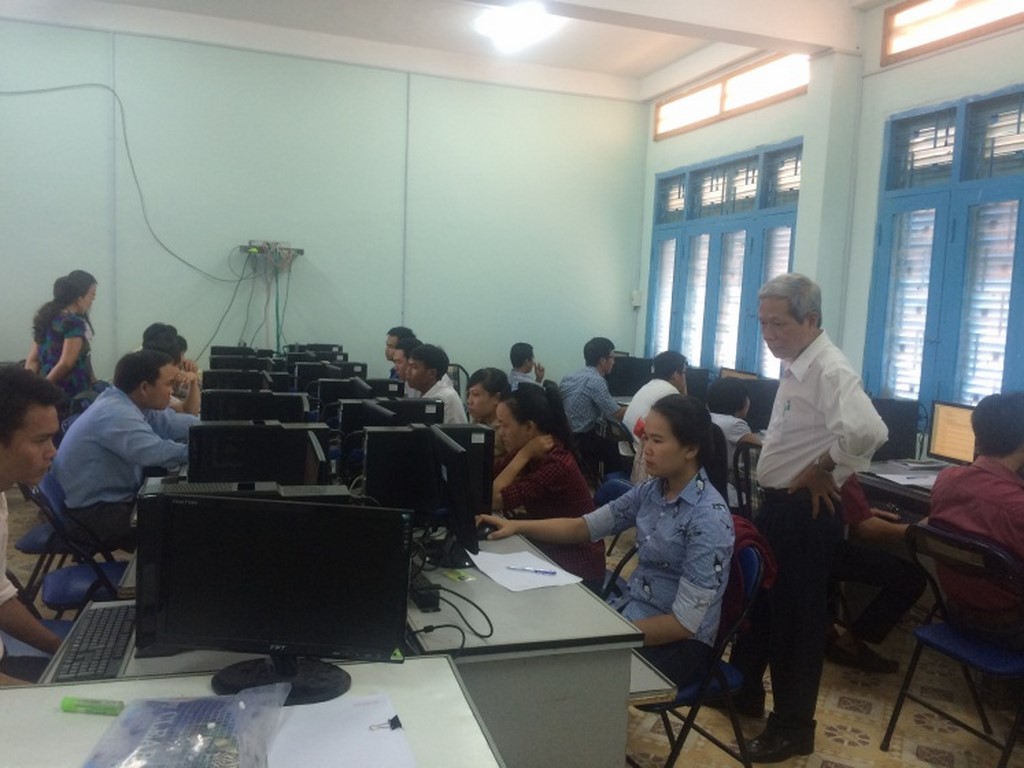
			Excel là phần mềm không thể thiếu đối với những người làm công việc hành chính - văn phòng. Để sử dụng thành thạo Excel cần nắm vững những kiến thức lý thuyết. Vì vậy việc rèn luyện và trau dồi kiến thức qua các đề thi trắc nghiệm trực tuyến hết sức cần thiết. Hãy cùng AZtest tìm hiểu cách tạo đề thi trắc nghiệm Excel 2010 với phần mềm sau đây.
		</div>
				<div class="imghome">
			<img alt="Cách tạo đề thi trắc nghiệm Excel 2010" src="https://aztest.vn/uploads/news/2019/trac-nghiem-excel-2010.jpg" width="460" class="img-thumbnail" />
						<p>
				<em>Cách tạo đề thi trắc nghiệm Excel 2010</em>
			</p>
		</div>
		<div class="clear"></div>
		<div id="bodytext" class="clearfix">
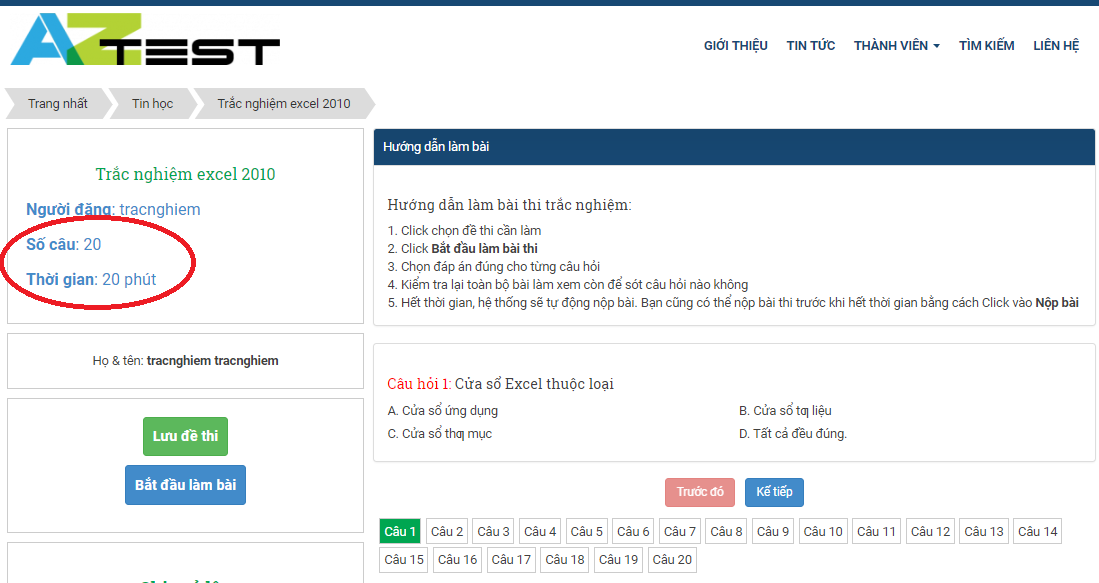
			<h3 dir="ltr" style="text-align: justify;"><strong><span style="font-size:14px;"><span style="font-family:Arial,Helvetica,sans-serif;">1. Excel 2010 có gì khác với phiên bản cũ</span></span></strong></h3><p dir="ltr" style="text-align: justify;"><span style="font-size:14px;"><span style="font-family:Arial,Helvetica,sans-serif;">Excel 2010 có nhiều cải tiến hơn so với phiên bản cũ, với nhiều chức năng tạo và quản lý bảng tính tốt hơn nhằm đáp ứng cho nhu cầu người dùng đa dạng và phức tạp hơn. Cụ thể hơn, Excel 2010 cải tiến Ribbon, công cụ quản lý cửa sổ làm việc, truy nhập cửa sổ làm việc theo cách thức mới, tương thích tốt hơn với các hệ điều hành mới.</span></span></p><div style="text-align:center"><figure class="image" style="display:inline-block"><img alt="trac nghiem excel 2010 1" height="525" src="https://aztest.vn/uploads/news/2019/trac-nghiem-excel-2010-1.jpg" width="700" /><figcaption><em>Excel 2010 có gì khác so với phiên bản cũ </em></figcaption></figure></div><p dir="ltr" style="text-align: justify;"><span style="font-size:14px;"><span style="font-family:Arial,Helvetica,sans-serif;">Excel 2010 là phiên bản tiếp theo của công cụ tạo bảng tính Excel với nhiều cải tiến về chức năng so với phiên bản cũ. Excel 2010 cập nhật giao diện Ribbon của Office 2010, cải tiến giải thuật, mở rộng phạm vi của các giá trị tính toán và tổ chức lại các hàm để kết quả tính được chính xác hơn.</span></span></p><p dir="ltr" style="text-align: justify;"><span style="font-size:14px;"><span style="font-family:Arial,Helvetica,sans-serif;">Excel 2010 bổ sung các mẫu biểu đồ mới hỗ trợ công việc của bạn, các chức năng tính toán được tối ưu hơn và tính năng chia sẻ trực tuyến cũng hiệu quả hơn.</span></span></p><p dir="ltr" style="text-align: justify;"><span style="font-size:14px;"><span style="font-family:Arial,Helvetica,sans-serif;">Phiên bản Excel 2010 hỗ trợ người dùng học Excel chuyên nghiệp hơn so với các phiên bản Excel 2007 hay 2003. Excel 2010 được cải tiến thêm nhiều tính năng cùng hiệu suất xử lý mạnh mẽ hơn.</span></span></p><h3 dir="ltr" style="text-align: justify;"><span style="font-size:14px;"><span style="font-family:Arial,Helvetica,sans-serif;"><strong>2. Bộ đề thi mẫu: Đề thi trắc nghiệm Excel 2010</strong></span></span></h3><p dir="ltr" style="text-align: justify;"><span style="font-size:14px;"><span style="font-family:Arial,Helvetica,sans-serif;">Nhằm tạo ra nguồn đề tham khảo chất lượng, AZtest đã biên soạn bộ đề thi mẫu: <a href="http://taodethitracnghiem.aztest.vn/Tin-hoc/trac-nghiem-excel-2010-57.html"><strong>Đề thi trắc nghiệm Excel 2010</strong>.</a></span></span></p><div style="text-align:center"><figure class="image" style="display:inline-block"><img alt="trac nghiem excel 2010 2" height="371" src="https://aztest.vn/uploads/news/2019/trac-nghiem-excel-2010-2.jpg" width="700" /><figcaption><em>Bộ đề thi mẫu: Đề thi trắc nghiệm Excel 2010</em></figcaption></figure></div><p dir="ltr" style="text-align: justify;"><span style="font-size:14px;"><span style="font-family:Arial,Helvetica,sans-serif;">Bộ đề thi mẫu được AZtest được biên soạn với cấu trúc 20 câu trắc nghiệm khách quan về nội dung Excel 2010, mỗi câu chỉ có một đáp án đúng. Đề thi được thực hiện trong vòng 20 phút. </span></span></p><p dir="ltr" style="text-align: justify;"><span style="font-size:14px;"><span style="font-family:Arial,Helvetica,sans-serif;"><em>&gt;&gt;&gt;Bạn có thể tham khảo thêm bộ đề thi <strong><a href="http://taodethitracnghiem.aztest.vn/Tin-hoc/trac-nghiem-excel-2010-57.html">tại đây</a></strong>.</em> </span></span></p><h3 dir="ltr" style="text-align: justify;"><span style="font-size:14px;"><span style="font-family:Arial,Helvetica,sans-serif;"><strong>3. Cách tạo đề thi trắc nghiệm Excel 2010</strong> </span></span></h3><p dir="ltr" style="text-align: justify;"><span style="font-size:14px;"><span style="font-family:Arial,Helvetica,sans-serif;">Để có được một ngân hàng đề thi trắc nghiệm Excel chất lượng trước hết bạn cần lựa chọn một trang web tạo đề thi trắc nghiệm trực tuyến uy tín và có những tính năng hữu ích đem lại sự thuận tiện trong quá trình sử dụng cho bạn. </span></span></p><p dir="ltr" style="text-align: justify;"><span style="font-size:14px;"><span style="font-family:Arial,Helvetica,sans-serif;">AZtest là một trong những trang web sẽ hỗ trợ tốt nhất cho bạn trong việc có được một ngân hàng đề thi được sắp xếp theo hệ thống, cho phép đưa các hình ảnh, âm thanh, video minh họa và đặc biệt hỗ trợ tốt trong việc tạo các đề thi có công thức toán học. </span></span></p><p dir="ltr" style="text-align: justify;"><span style="font-size:14px;"><span style="font-family:Arial,Helvetica,sans-serif;">Từ giao diện của AZtest, người dùng có thể cá nhân hóa thành trang web của mình từ tên miền, giao diện, logo riêng,...để tạo thương hiệu riêng cho mình. </span></span></p><p dir="ltr" style="text-align: justify;"><span style="font-size:14px;"><span style="font-family:Arial,Helvetica,sans-serif;">Để tạo đề thi trên AZtest, bạn cần đăng ký khởi tạo tài khoản<strong> <a href="https://aztest.vn/site/register/">tại đây</a></strong>:</span></span></p><div style="text-align:center"><figure class="image" style="display:inline-block"><a href="https://aztest.vn/site/register/"><img alt="thi tin hoc co ban 4" height="123" src="https://aztest.vn/uploads/news/2019/thi-tin-hoc-co-ban-4.png" width="300" /></a><figcaption><em>Đăng ký tại đây</em></figcaption></figure></div><p dir="ltr" style="text-align: justify;"><span style="font-size:14px;"><span style="font-family:Arial,Helvetica,sans-serif;">Sau khi đã có tài khoản, bạn hãy click vào khu vực dành cho quản trị để tạo đề thi. Bạn có thể tham khảo tài liệu sử dụng AZTest tại đây: <strong><a href="https://docs.aztest.vn/xoa-du-lieu-mau/">https://docs.aztest.vn/</a></strong>. Trong quá trình tạo đề thi, nếu gặp phải những khó khăn, vướng mắc bạn có thể liên hệ hotline: 02336 270 610 - 0905 908 430 hoặc nhắn tin tới fanpage<a href="https://www.facebook.com/aztest.vn/"> <strong>https://www.facebook.com/aztest.vn/ </strong></a>để được tư vấn và hỗ trợ hoàn toàn miễn phí.</span></span></p><p dir="ltr" style="text-align: justify;"><span style="font-size:14px;"><span style="font-family:Arial,Helvetica,sans-serif;">Hy vọng bài viết trên đây có thể giúp bạn tạo được <strong><a href="http://taodethitracnghiem.aztest.vn/Tin-hoc/trac-nghiem-excel-2010-57.html">đề thi trắc nghiệm Excel 2010</a>.</strong></span></span></p><p dir="ltr" style="text-align: justify;"><span style="font-size:14px;"><span style="font-family:Arial,Helvetica,sans-serif;"><span style="color:rgb(231, 76, 60);"><strong>ĐỪNG QUÊN ĐỂ LẠI EMAIL CUỐI BÀI ĐỂ NHẬN THÊM NHỮNG THÔNG TIN HẤP DẪN CỦA AZTEST</strong></span></span></span></p><p dir="ltr" style="text-align: justify;"><span style="font-size:14px;"><span style="font-family:Arial,Helvetica,sans-serif;"><strong>&gt;&gt;&gt; Xem thêm: <a href="https://aztest.vn/tin-tuc/thong-bao/cach-tao-de-thi-trac-nghiem-tin-hoc-co-ban-chung-chi-cong-nghe-thong-tin-161.html">Cách tạo đề thi trắc nghiệm tin học cơ bản chứng chỉ công nghệ thông tin</a></strong></span></span></p><p dir="ltr" style="text-align: justify;"><span style="font-size:14px;"><span style="font-family:Arial,Helvetica,sans-serif;"><strong>---------------------------------------------------------------------------------------------------------</strong></span></span></p><p dir="ltr" style="text-align: justify;"><span style="font-size:14px;"><span style="font-family:Arial,Helvetica,sans-serif;"><strong>AZtest là hệ thống tạo lập website thi trắc nghiệm trực tuyến do<a href="https://tdfoss.vn/"> CÔNG TY TNHH PHÁT TRIỂN VÀ DỊCH VỤ NGUỒN MỞ THUẬN ĐỨC</a> phát triển. Với AZtest, người dùng có thể dễ dàng sở hữu một website tổ chức ôn tập, thi trắc nghiệm trực tuyến hoàn toàn miễn phí, độc lập, được cá nhân hóa theo yêu cầu của người quản trị.</strong></span></span></p><p dir="ltr" style="text-align: justify;"><span style="font-size:14px;"><span style="font-family:Arial,Helvetica,sans-serif;"><strong>Liên hệ <span style="color:rgb(231, 76, 60);">02336.270.610 - 0905.908.430</span> (hotline 24/7) hoặc Fanpage <a href="https://fb.me/aztest.vn">https://fb.me/aztest.vn </a>để được tư vấn trực tiếp bởi đội ngũ kỹ thuật viên của AZtest.</strong></span></span></p><span style="font-size:14px;"><span style="display: none;">&nbsp;</span></span><span style="display: none;">&nbsp;</span>
		</div>
	</div>
	<div id="footer" class="clearfix">
		<div id="url">
			<strong>URL của bản tin này: </strong><a href="https://aztest.vn/tin-tuc/savefile/thong-bao/cach-tao-de-thi-trac-nghiem-excel-2010-198.html" title="Cách tạo đề thi trắc nghiệm Excel 2010">https://aztest.vn/tin-tuc/savefile/thong-bao/cach-tao-de-thi-trac-nghiem-excel-2010-198.html</a>

		</div>
		<div class="clear"></div>
		<div class="copyright">
			&copy; Hệ thống tạo lập website thi trắc nghiệm trực tuyến AZtest
		</div>
		<div id="contact">
			<a href="mailto:contact@aztest.vn">contact@aztest.vn</a>
		</div>
	</div>
</div>
        <div id="timeoutsess" class="chromeframe">
            Bạn đã không sử dụng Site, <a onclick="timeoutsesscancel();" href="https://aztest.vn/#">Bấm vào đây để duy trì trạng thái đăng nhập</a>. Thời gian chờ: <span id="secField"> 60 </span> giây
        </div>
        <div id="openidResult" class="nv-alert" style="display:none"></div>
        <div id="openidBt" data-result="" data-redirect=""></div>
<script src="https://aztest.vn/assets/js/jquery/jquery.min.js"></script>
<script>var nv_base_siteurl="/",nv_lang_data="vi",nv_lang_interface="vi",nv_name_variable="nv",nv_fc_variable="op",nv_lang_variable="language",nv_module_name="tin-tuc",nv_func_name="savefile",nv_is_user=0, nv_my_ofs=-4,nv_my_abbr="EDT",nv_cookie_prefix="nv4c_p74o3",nv_check_pass_mstime=28738000,nv_area_admin=0,nv_safemode=0,theme_responsive=1,nv_recaptcha_ver=2,nv_recaptcha_sitekey="6LemcGUUAAAAAPjkX78IcNaDnVwr5S9dVb-mGciG",nv_recaptcha_type="image",XSSsanitize=1;</script>
<script src="https://aztest.vn/assets/js/language/vi.js"></script>
<script src="https://aztest.vn/assets/js/DOMPurify/purify.js"></script>
<script src="https://aztest.vn/assets/js/global.js"></script>
<script src="https://aztest.vn/assets/js/site.js"></script>
<script src="https://aztest.vn/themes/tdfoss/js/news.js"></script>
<script src="https://aztest.vn/themes/tdfoss/js/main.js"></script>
<script src="https://aztest.vn/themes/tdfoss/js/custom.js"></script>
<script>
			!function(f,b,e,v,n,t,s)
			{if(f.fbq)return;n=f.fbq=function(){n.callMethod?
			n.callMethod.apply(n,arguments):n.queue.push(arguments)};
			if(!f._fbq)f._fbq=n;n.push=n;n.loaded=!0;n.version='2.0';
			n.queue=[];t=b.createElement(e);t.async=!0;
			t.src=v;s=b.getElementsByTagName(e)[0];
			s.parentNode.insertBefore(t,s)}(window, document,'script',
			'https://connect.facebook.net/en_US/fbevents.js');
			fbq('init', '496798233988223');
			fbq('track', 'PageView');
		</script>
<script src="https://sp.zalo.me/plugins/sdk.js"></script>
<script src="https://aztest.vn/themes/default/js/bootstrap.min.js"></script>
<script src="https://aztest.vn/themes/tdfoss/assets/javascripts/plugins/hover_dropdown/twitter-bootstrap-hover-dropdown.min.js"></script>
<script src="https://aztest.vn/themes/tdfoss/assets/javascripts/jednotka.js"></script>
</body>
</html>